Performance
Disable emojis & oEmbed, clean up wp_head, strip asset query strings, control the Heartbeat API, lazy-load iframes and add DNS-prefetch and preload hints — the unglamorous wins that make pages load faster and improve Core Web Vitals.
A lightweight, modular optimization & WooCommerce toolkit for WordPress. Every feature is an independent module you switch on from a modern dashboard — and disabled modules add no PHP, CSS or JS to your site.
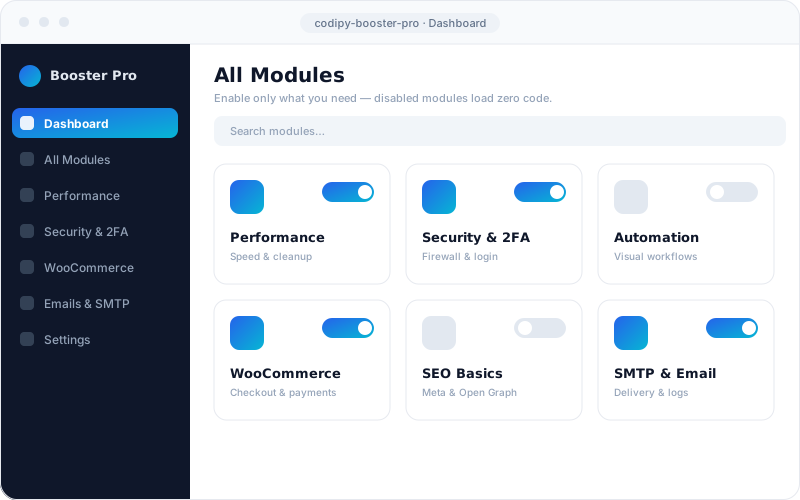
Independent modules
Loaded when a module is off
Single cached settings row
Vanilla-JS dashboard, ~few hundred KB
Most WordPress sites end up carrying a dozen single-purpose plugins — one for SMTP, one for security headers, another for checkout tweaks, a fourth for a couple of shortcodes. Each one loads its own code on every request, whether you use it that day or not, and the site quietly gets heavier, slower and harder to maintain. Every extra plugin is also one more thing to update and one more possible security hole.
We wanted the opposite: a plugin that never pretends to be a hundred half-finished features, but ships a clean, extensible core with a set of genuinely useful modules you turn on only when you need them. Switch a module off and it registers no hooks, enqueues no assets and runs no queries — it truly loads zero code. That single idea shapes everything about how Codipy Booster Pro is built, and it's why you can consolidate several plugins without the usual performance tax.
There's no build step and no framework bloat. The admin dashboard is a dependency-free vanilla-JS app served from one JS and one CSS file, and its assets load only on the plugin's own screen — never on the front end. A ModuleManager lazy-loads each module, calling its register() only when the module is both enabled and available in the current environment. All settings live in one autoloaded cbp_settings option, so reading state costs a single cached lookup rather than a scatter of database calls. The whole plugin footprint is just a few hundred kilobytes.
Every capability is its own module — opt-in, individually configurable and safe to leave off. Here are the headline categories.
Disable emojis & oEmbed, clean up wp_head, strip asset query strings, control the Heartbeat API, lazy-load iframes and add DNS-prefetch and preload hints — the unglamorous wins that make pages load faster and improve Core Web Vitals.
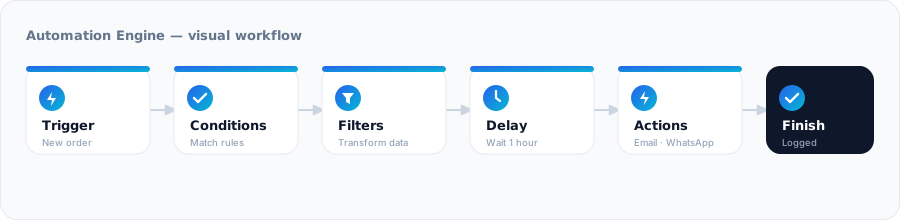
A visual workflow builder — Trigger → Conditions → Filters → Delay → Actions → Finish. 25 triggers, 30 condition fields, 14 filter families and 30 actions, with a background queue, incoming/outgoing webhooks, a public REST API, execution logs and an analytics dashboard.
Two-factor authentication (authenticator apps, emailed codes, single-use backup codes), a WAF-lite firewall that blocks probes before WordPress boots, an anti-spam shield, password policy, and login hardening — XML-RPC off, blocked user enumeration, security headers and a login-attempt limiter.
Payment-gateway fee/discount rules and visibility, city-based shipping rates, PDF invoices from the order screen, custom prices & currencies, catalog mode, checkout-field control, button & price labels, and marketing tools like GA4 / Meta Pixel and URL coupons.
An email-template designer (logo, brand colours, fonts, buttons, footer, custom CSS) with live preview and test send, plus reliable SMTP delivery — the password stored AES-256 encrypted — and a full email log with sent/failed status and auto-purge.
Meta description, canonical URLs, Open Graph and Twitter Card tags out of the box — and it politely steps aside, auto-skipping itself, whenever a dedicated SEO suite like Yoast, Rank Math, AIOSEO or The SEO Framework is already active.
The headline feature is a no-code workflow builder that connects your store to the rest of your stack. Pick a trigger, add conditions and filters, insert a delay if you need one, then fire off actions — send an email through the template designer, message a customer on WhatsApp, post to Slack, Telegram or Discord, call an external API, push to Google Sheets, or run your own PHP hook.
Grouped by category, every module is opt-in and disabled by default — so activating the plugin changes nothing until you choose it.
wp_head cleanupUpload the plugin and activate it. Nothing changes on your site yet — every module ships disabled by default.
Open the dashboard and toggle only the modules you want. Each opens on its own full-width settings page.
Remove the single-purpose plugins those modules replace — lighter site, fewer updates, one place to manage it all.
Every plan includes all modules — you only pay for how many sites you run. 7-day free trial · 14-day money-back guarantee.
Secure checkout by Freemius · VAT handled for you · Visa, Mastercard, Amex & PayPal
cbp_settings option for all state$wpdb->prepareNo plugin honestly does, and we don't claim to. Codipy Booster Pro ships a strong, extensible core plus fully-functional modules for the highest-impact features, so you can retire several single-purpose plugins and cut bloat — without pretending one plugin can do everything.
No. Disabled modules load no code at all — no hooks, no assets, no queries. Enabled modules only add their own hooks, and the dashboard's CSS and JS load only on the plugin's own admin screen, never on the front end.
Yes. The WooCommerce modules unlock automatically when WooCommerce is active and support High-Performance Order Storage. It works alongside popular themes and page builders, and steps aside when a dedicated plugin — such as an SEO suite — is already handling that job.
Yes. It's encrypted with AES-256 using a key derived from your site's secret salts, and it's never sent back to the browser.
Yes. Implement ModuleInterface (or extend AbstractModule) and register it via the cbp_modules filter. The dashboard, settings UI and REST layer pick it up automatically — no core edits required.